
Ergonomic factors
Ergonomics is the study of the effects of the work environment on the health of workers. The way a workstation and its parts are designed can affect your physical well-being. A suitable workstation allows the user to adjust the chair, desk, lighting and computer equipment.
Ergonomic standards
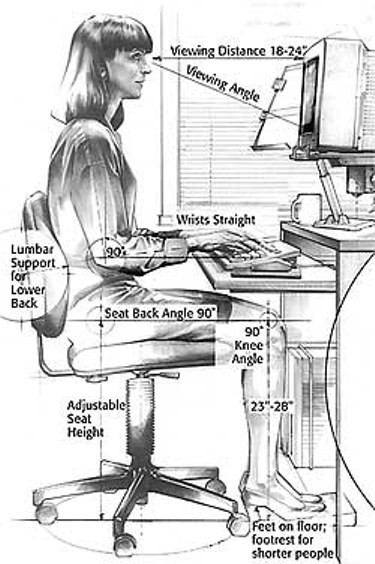 The German Institute for Standardisation and the Trade Cooperative Association developed 30 ergonomic standards. These standards serve as a guideline for organisations contemplating the application of ergonomics factors to increase office productivity. They include the following types of items:
- Keyboards should be detachable and ergonomically designed
- Display monitors need to be adjustable
- Keyboard slope no more than 15 degrees
- Work areas and display monitors should meet specific height, depth and viewing angle specifications
OSHA (Occupational Safety and Health Administration) have also set up certain rules for ergonomics.
The International Organisation for Standardisation (IOS) specifies that well designed tasks should safeguard the worker’s health and safety, promote the individual’s well-being and facilitate task performance.
The height of the desktop should allow your elbows to be parallel to the computer keyboard and floor. This arrangement prevents unnecessary strain on the arms and wrists. Keep the desktop clear of materials no related to the current task.
Two kinds of lighting are often found in workstations – ambient and task. Ambient lighting is provided by overhead light fixtures for the entire work area. Although you may not be able to adjust the overhead lighting, you can adjust the arrangement of your workstation. Task lighting focuses on the immediate work area and should be adjustable for your specific needs. Adjust the task lighting to prevent glare on your computer monitor or the desktop. Eliminate dark or dimly lit areas where you may have to retrieve files or work away from your desktop.
Your computer monitor should be placed at eye level to help reduce eyestrain and neck pain. Glare on the monitor often contributes to eyestrain. Common symptoms of eye strain are teary or burning eyes, blurred vision and headaches. Glare from the outside light can be prevented by placing the computer monitor so that you do not face a window or have your back to a window. Peripheral input devices, such as the mouse, should be located next to the computer keyboard. The movement of the arm from the keyboard to the input device should be natural and without strain.
Other ergonomic considerations:
- Lighting – task, ambient, natural daylight, fluorescent and incandescent
- Colour conditioning e.g. red (heat, action, and excitement), orange and yellow (warmth, cheerfulness). The colour of an office can have an effect on how you perform at work. Interestingly enough if you go around to big companies, you find that they are blues or lilacs which seem to be cool and refreshing.
- Sound control – measured in decibels
- Masking – white noise or white sound. There is a hum in the background which drowns out most of the noise. If you do work in a building that uses white sound / masking and they switch it off, you are suddenly aware of how much sound it drowns out.
- Air conditioning – must be maintained and serviced regularly.
- Surface textures, shapes and arrangements – these must be placed so that the worker is comfortable at all times. An office professional should have a u-shaped desk where they can roll their chair from one side to another without putting themselves in danger.
- Control of static electricity – some companies have purchased plastic mats which are placed under your chair to prevent static electricity at your workplace
- Power sources – these should be neat and tidy and tied up or placed in poles. Wires should not run across floor where people can trip on them!